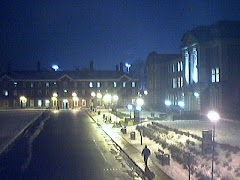
In recent days, there have been a few problems:
The automatic gain control of the camera seems not to operate properly. In the morning, after sunset when the image gets very bright, the gain control does not properly adjust and instead remains on a very high sensitivity setting, therefore completely overexposing the picture. The reason for this is not clear; it may be that the PC is not powerful enough, because the gain control appears to be done through the software device driver. I had to restart the camera capture, then the gain control worked again.
Today the weather here in Leeds was so warm and sunny, that the room in which the camera is hosted, heated up significantly. This prompted some people in the room to open the window - and this knocked down the camera, so for a while the image was taken while the camera was simply dangling from its cable. I did now place the camera at a higher location, so that opening the window would not disturb its mounting.
Right now the cam is operating properly, but it needs a close watch, in terms of the faulty gain control and the mounting position.
Showing posts with label webcam. Show all posts
Showing posts with label webcam. Show all posts
Thursday, September 29, 2011


Friday, September 23, 2011
Small Problems - Solved
This morning there had been a strange problem: the images were captured, but were all white. This had to do with the automatic camera exposure control, which failed to work. so the image was on "night" setting, with open aperture and full exposure, then hereby overexposing when the sun came out. It should automatically correct, because the auto-exposure setting is on. But I noticed this behavior already earlier some time ago: the exposure control does not always work, when the framerate of the camera itself is set to a low value (10 pic per second). I had to restart the camera, then the problem solved itself.
The other issue had a different cause: It appeared that when loading this blog web page, then in the beginning, there is no image shown. Only after the first refresh the image appeared. The reason for this error had not been apparent; in separate test of the script, the image appeared always the very first time; only in the blog there seemed this issue. The principle of the image display had been that in order to save bandwidth, a temporary image was created on the server, based on the requests for image size. This ensured that when only a small image is requested, for example from a mobile phone, then only the image in the resized form would be transmitted. This works fine - except in the blog when loaded for the first time. It appears that the image file creation takes too long, and the file is not ready when it is supposed to be shown. Still, not yet explainable, as an earlier PHP query for the file shows its size, indicating that it already exists. But for some reason, the <img> tag then is still not able to produce the image. The solution: I abandoned for now the image resizing, and the script is now sending the full image out, independent for the size request. This at least works, and the image is available without delay.
The other issue had a different cause: It appeared that when loading this blog web page, then in the beginning, there is no image shown. Only after the first refresh the image appeared. The reason for this error had not been apparent; in separate test of the script, the image appeared always the very first time; only in the blog there seemed this issue. The principle of the image display had been that in order to save bandwidth, a temporary image was created on the server, based on the requests for image size. This ensured that when only a small image is requested, for example from a mobile phone, then only the image in the resized form would be transmitted. This works fine - except in the blog when loaded for the first time. It appears that the image file creation takes too long, and the file is not ready when it is supposed to be shown. Still, not yet explainable, as an earlier PHP query for the file shows its size, indicating that it already exists. But for some reason, the <img> tag then is still not able to produce the image. The solution: I abandoned for now the image resizing, and the script is now sending the full image out, independent for the size request. This at least works, and the image is available without delay.
Thursday, September 22, 2011
Camera again showing the Acre
Finally, the web cam again shows the James Graham Building and the North end of The Acre at the Headingley Campus of Leeds Metropolitan University. After much popular demand for this view, I did set it up again this afternoon. This time, the view is even better than the previous Acre view, showing the scenery from the 2nd floor of Caedmon. This is definitely a more glorious view than the one onto the back parking lot from my window. I hope the webcam and the software will run reliably for a long time!
Friday, September 16, 2011
After more than 6 months of inactivity, the Headingley Caedmon webcam is active again. The camera had broken at the end of February, and since the setup (camera and computer) was in a different office than mine, I did not replace it.
Now because of a restructuring of office locations, that office where the camera was located is now vacant again, and I got the system and set it up in my own office. The view from there is not as grand as the one onto the Acre, instead it goes onto the back of the Caedmon building, onto the parking lot between Caedmon Hall and Priestley Hall. In the back is the building of the Student Union visible.
Well, better than nothing! At least I do have the camera and its setup again under my immediate control, and hopefully I will be able to maintain it properly.
Friday, November 19, 2010
Recent Problem
Today the webserver with the Caedmon webcam pointing to the Acre and the James Graham Building was restarted again. It had been off for an unknown time, probably due to a temporary shut-down a short while ago. Since I no longer have an office in which this webcam is located, I was not able to immediately restart it after I had noticed the shut-down. Another issue hid this shutdown from me for a while: due to a wrong configuration of the 2nd webcam server (which points to the parking lot between Priestley and Caedmin), the picture of that server replaced the one from the main webcam, with the result that the supervisory process (which checks if there is no new image within 24 hours) has not detected a lack of images, and therefore has not sent a notification about the webcam outage.
This has now been fixed, and both webcams run properly as intended. The Headingley Caedmon Webcam has indeed been running for several months without me ever visiting or maintaining the server.
This has now been fixed, and both webcams run properly as intended. The Headingley Caedmon Webcam has indeed been running for several months without me ever visiting or maintaining the server.
Wednesday, August 4, 2010
One week camera outage
The webcam (with its PC) had been running continuously since March 2010 - quite robustly without any problems. On Friday 23.July 2010 in the afternoon a brief power outage occurred at the Headingley campus. And after that the webcam image was no longer updated. I had no opportunity to fix this problem before now, so the cam image remained steady for more than a week - apologies!
When I checked today, the computer was completely shut-down. It might have also been that the PC was shutdown by someone, unrelated to the power outage. Restarting it had a slight problem, due to two different webcam software version that had been installed. Version 1.0.5 was the one that ran now properly. In any case the camera is up and running now fine.
When I checked today, the computer was completely shut-down. It might have also been that the PC was shutdown by someone, unrelated to the power outage. Restarting it had a slight problem, due to two different webcam software version that had been installed. Version 1.0.5 was the one that ran now properly. In any case the camera is up and running now fine.
Wednesday, January 20, 2010
Some Problems...
Since the porting of the webcam onto the new PC at the beginning of this year, there have been some instabilities: the image appears suddenly not to be updated, while the software still sends new images in a regular time interval to the server. But these images are constant - so on the webcam viewers (embedded images in websites such as this blog) the image appears not to change, while the timestamp is constantly being updated.
On the capture PC, this problem shows up as the software running properly, but the image just being black. No error message or exception was reported. The same version of the software runs fine in the Back-Caedmon camera; so I assume that the problem lies with the PC in 101 Caedmon which may be too slow. Today I have reduced the image capture size from 1280x1024 to 640x480, in order to reduce the requirements of bandwidth, image storage and processing for each captured frame. I will have to monitor if this solves the problem.
On the capture PC, this problem shows up as the software running properly, but the image just being black. No error message or exception was reported. The same version of the software runs fine in the Back-Caedmon camera; so I assume that the problem lies with the PC in 101 Caedmon which may be too slow. Today I have reduced the image capture size from 1280x1024 to 640x480, in order to reduce the requirements of bandwidth, image storage and processing for each captured frame. I will have to monitor if this solves the problem.
Friday, January 15, 2010
Back-Caedmon Camera Off
The camera in my new office facing into the back parking lot between Caedmon Hall and Priestley Hall has been switched off over the weekend - the USB cam is needed for another project. So for the time being, there will be the only the most recent image shown in the top right corner of this blog.
I assume that I will be able to switch this camera on again on Monday morning.
I assume that I will be able to switch this camera on again on Monday morning.
Tuesday, January 12, 2010
Problem with the Webcam
There appears to be a problem with the webcam system: the communication between the camera and the capture software stops, and no new image is captured. This happened now already for several times in the last few days - the current image, for example, is one from during the day. It appears that the software keeps running and uploading the same file - hence the new image date/time. But the image itself remains the same.
The reason for this could be either the cold which influences the camera itself, or the new PC and its OS environment where the capture software is running. I can now compare this PC with the "old" PC which now runs the Caedmon-Back-Camera. This one also had shown the connection error today during the day, but now appears to run stable. I will check tomorrow.
The reason for this could be either the cold which influences the camera itself, or the new PC and its OS environment where the capture software is running. I can now compare this PC with the "old" PC which now runs the Caedmon-Back-Camera. This one also had shown the connection error today during the day, but now appears to run stable. I will check tomorrow.
New Software Version - and Additional Location
The capture software has been upgraded to allow a slightly easier use.
In addition, a second instance of the webcam has now been set up in my office, showing a view onto the parking lot between Caedmon Hall and Priestley Hall. This webcam will not be advertised much, but will be embedded in a few of my sites for esperimentation. It also will allow me to test new features before releasing them onto the main webcam which points to the Acre.
In addition, a second instance of the webcam has now been set up in my office, showing a view onto the parking lot between Caedmon Hall and Priestley Hall. This webcam will not be advertised much, but will be embedded in a few of my sites for esperimentation. It also will allow me to test new features before releasing them onto the main webcam which points to the Acre.
Wednesday, January 6, 2010
Webcam Running with Acre View Again
The Leeds Met Caedmon Webcam is again at its location in office 101. After I had moved office in the beginning of November 2009, I had to dismantle the camera setup and take it with me to my new office location, which did not have such an attractive view (into the back of the buildings Caedmon Hall and Priestley Hall). However, the plan was to setup a new PC, and the webcam would be operated further.
This did not work initially, as there were some technical issues with that PC, and I did not have the time to take care of these issues during the past 2 months. Yesterday, however, I was able to setup the software properly and to reinstate the web cam setup at its original location. Since this morning, camera images from the Acre and the James Graham Building are sent again to our web server.
As you see, there is now a winter wonderland here in Leeds - a snow blanket of at least 15 cm is covering everything, making road traffic a nightmare, but providing a wonderful sight!
This did not work initially, as there were some technical issues with that PC, and I did not have the time to take care of these issues during the past 2 months. Yesterday, however, I was able to setup the software properly and to reinstate the web cam setup at its original location. Since this morning, camera images from the Acre and the James Graham Building are sent again to our web server.
As you see, there is now a winter wonderland here in Leeds - a snow blanket of at least 15 cm is covering everything, making road traffic a nightmare, but providing a wonderful sight!
Tuesday, January 5, 2010
Webcam at Temporary Location
A happy New Year 2010 to everyone!
In the past two months the webcam has been down. The reason for this was that a new PC had to be used in order to keep the webcam at the same location, and there were some issues regarding the installation of that software which I had no time to address, due to other work that I had to do. I am now addressing these issues, and I hope to have the webcam up and running again at the previous location.
As a temporary fix, I am now using the previous PC where the functioning release of the capture software is running. This does NOT point to the Leeds Met Acre and the James Graham building, but points instead to the parking lot between the Caedmon and Priestley buildings. This view is less attractive than the front view of the James Graham building, but since it is currently snowing, the view is not that bad.

The issue regarding the software is quite strange: despite having installed the latest .NET releases, the installation routine requires some particular files to be installed. It could be that these are a part of MS Visual Studio, which had been installed on both the PCs where I had developed and used the webcam before. I hope to figure this out soon. In the meantime, the camera will be operational from this view behind Caedmon Hall. The building in sight (to the right) is Priestley Hall. In the background on the left you can see the Metceno building. And at the extreme right there is a part of Caedmon Hall.
In the past two months the webcam has been down. The reason for this was that a new PC had to be used in order to keep the webcam at the same location, and there were some issues regarding the installation of that software which I had no time to address, due to other work that I had to do. I am now addressing these issues, and I hope to have the webcam up and running again at the previous location.
As a temporary fix, I am now using the previous PC where the functioning release of the capture software is running. This does NOT point to the Leeds Met Acre and the James Graham building, but points instead to the parking lot between the Caedmon and Priestley buildings. This view is less attractive than the front view of the James Graham building, but since it is currently snowing, the view is not that bad.

The issue regarding the software is quite strange: despite having installed the latest .NET releases, the installation routine requires some particular files to be installed. It could be that these are a part of MS Visual Studio, which had been installed on both the PCs where I had developed and used the webcam before. I hope to figure this out soon. In the meantime, the camera will be operational from this view behind Caedmon Hall. The building in sight (to the right) is Priestley Hall. In the background on the left you can see the Metceno building. And at the extreme right there is a part of Caedmon Hall.
Wednesday, November 11, 2009
Working on Restarting the WebCam
As I have moved office, the webcam that I had operated from there needed to shut down. However, thanks to our IT support I have gotten another PC and am setting up now the webcam at its old location. There appears to be a problem with missing DLLs; I am investigating and hope to have soon agian the cam up and running. Stay tuned1!
Friday, October 30, 2009
Webcam Shutting Down on 2.November
From Monday morning (2.November 2009), 9:00, this webcam will be temporarily shut down due to office move.
After almost 3 years in office Caedmon 101 I will have to move to another office, because this current office is needed for other purposes because of its particular design. It has not yet been determined what will happen to this webcam: it might be possible that the camera can continue to run in this office. Alternatively it would be relocated to a slightly different viewpoint. This would, however, not be my new office, because that one does not have such a nice view: my new office just faces a parking lot behind the Caedmon Building.
I will keep you updated on the fate and the future of this webcam.
But for now: thanks to everyone who has viewed this website and has enjoyed the camera view!
After almost 3 years in office Caedmon 101 I will have to move to another office, because this current office is needed for other purposes because of its particular design. It has not yet been determined what will happen to this webcam: it might be possible that the camera can continue to run in this office. Alternatively it would be relocated to a slightly different viewpoint. This would, however, not be my new office, because that one does not have such a nice view: my new office just faces a parking lot behind the Caedmon Building.
I will keep you updated on the fate and the future of this webcam.
But for now: thanks to everyone who has viewed this website and has enjoyed the camera view!
Wednesday, July 15, 2009
Capture Software Available
The camera capture software is now at a stage that I think it can be distributed - without warranty!
A link for automatic installation is available here (works properly only in Microsoft Explorer).
The software comes without any instructions - I hope that its use is self-explanatory. I will post within the next few weeks some guidance notes about how to configure it properly, but for now I do not have the time to do this. It has been tested only on Windows XP, and only with 3 cameras: Microsoft LifeCam VX-600, Philips ToUCam Pro, and Phillips SPC 200NC.
In principle, the software allows to capture one individual image at a preset time interval, which it stores as a JPG file locally. After the saving, it can also FTP the file to a remote web server, and it can put it on the user's desktop as a background image.
Just a few notes for configuration here:
After start, the software will try to connect to the first camera it finds. If no camera is connected, then it runs a detection thread in the background which will connect to a camera once it is plugged in. So a "hot-plugin" works, but not a hot-plug-out - once a camera is connected, the software will get an error when the camera is unplugged during operation.
If several cameras are connected, the user can chose one with "Devices". The compressors there have not been tested - it is recommended to leave them at "none".
The "Options" menu allows to access specific camera options. These are provided by the camera drivers and are unfortunately not stored, so each time the software is restarted, these options have to be selected again.
Do not use the "Audio Capture" - this is not yet implemented.
The "Video" tab shows the live video from the camera in preview mode. A few cameras allow the selection of the capture size with the combobox, but this is not working very stable - it is better to select the image capture size and the framerate with the Options>PropertyPages dialogs.
The actually captured single image can be shown in a "separate window" and also can be placed on the "desktop" as a background.
The "Timer" tab allows to control the timer for the single image capture: the capture rate is set by the interval between the image captures, and the file name for this image and its location directory can be selected. An image series can be stored by automatically adding a number to the images, and the starting number can be entered. There is also a start/stop timer for indicating time of series capture in case of absence. And with a check box, the image can be automatically sent to an FTP server.
The "FTP" tab allows the configuration of an FTP server: server name, user name and password can be set. Further, the remote folder on the server can be set. Precede the folder directory by "//" for an absolute path from the server root; otherwise the "home" directory of the server for the particular user will be used as a root. The local directory can be also set here - it is usually the directory where the capture software stores the captured file.
Again, no warranty, and no support for using this software!!!
A link for automatic installation is available here (works properly only in Microsoft Explorer).
The software comes without any instructions - I hope that its use is self-explanatory. I will post within the next few weeks some guidance notes about how to configure it properly, but for now I do not have the time to do this. It has been tested only on Windows XP, and only with 3 cameras: Microsoft LifeCam VX-600, Philips ToUCam Pro, and Phillips SPC 200NC.
In principle, the software allows to capture one individual image at a preset time interval, which it stores as a JPG file locally. After the saving, it can also FTP the file to a remote web server, and it can put it on the user's desktop as a background image.
Just a few notes for configuration here:
After start, the software will try to connect to the first camera it finds. If no camera is connected, then it runs a detection thread in the background which will connect to a camera once it is plugged in. So a "hot-plugin" works, but not a hot-plug-out - once a camera is connected, the software will get an error when the camera is unplugged during operation.
If several cameras are connected, the user can chose one with "Devices". The compressors there have not been tested - it is recommended to leave them at "none".
The "Options" menu allows to access specific camera options. These are provided by the camera drivers and are unfortunately not stored, so each time the software is restarted, these options have to be selected again.
Do not use the "Audio Capture" - this is not yet implemented.
The "Video" tab shows the live video from the camera in preview mode. A few cameras allow the selection of the capture size with the combobox, but this is not working very stable - it is better to select the image capture size and the framerate with the Options>PropertyPages dialogs.
The actually captured single image can be shown in a "separate window" and also can be placed on the "desktop" as a background.
The "Timer" tab allows to control the timer for the single image capture: the capture rate is set by the interval between the image captures, and the file name for this image and its location directory can be selected. An image series can be stored by automatically adding a number to the images, and the starting number can be entered. There is also a start/stop timer for indicating time of series capture in case of absence. And with a check box, the image can be automatically sent to an FTP server.
The "FTP" tab allows the configuration of an FTP server: server name, user name and password can be set. Further, the remote folder on the server can be set. Precede the folder directory by "//" for an absolute path from the server root; otherwise the "home" directory of the server for the particular user will be used as a root. The local directory can be also set here - it is usually the directory where the capture software stores the captured file.
Again, no warranty, and no support for using this software!!!
Wednesday, June 3, 2009
Sometimes Over-Exposure of Cam Image
The webcam sometimes does not properly expose the image. This happens despite all setting being on automatic. Most often this happens when the frame rate is set quite low: at 5 fps this seems to happen constantly, while it very rarely happens at 30 fps.
Today early aftenooon I noticed this overexposer and have reset the framerate from 5 to 30 fps - now the exposer appears to be ok.
Today early aftenooon I noticed this overexposer and have reset the framerate from 5 to 30 fps - now the exposer appears to be ok.
Wednesday, November 26, 2008
Webcam up again
After the "switch-off" over the weekend and my two-day absence from work due to illness, the webcam is again up and running.
Friday, November 21, 2008
Webcam down over the weekend
This weekend, we do have a test going on at Leeds Met: shutting down all unnecessary equipment, and measuring the consumed power under these circumstances. Since this webcam is not really deemed "necessary", it will remain shut-down over the weekend and will only be restarted on Monday, 24.11.
Monday, October 13, 2008
Marquee has been dismantled

The marquee has now been dismantled. A time lapse sequence of more than 7000 individual images has been recorded which can be integrated into a fast-forward-running video. The recording has now stopped, the camera has been turned to show again the James Graham Building, and the image capture time period has been shortened from 2 minutes to 30 seconds.
Subscribe to:
Posts (Atom)